
Playful Eats: Fix Picky Eating
SpeakEasy CommunityParenting
4.421.00 Reviews
- Version
- 1.0.6
- Installs
- 10.00K
- Age Rating
- Everyone
Screenshots



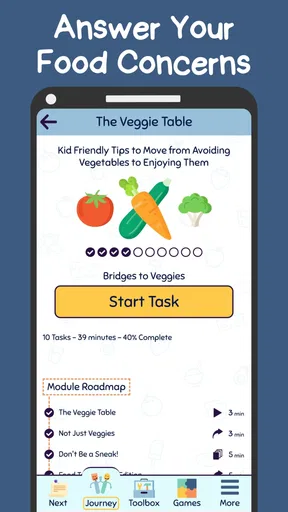


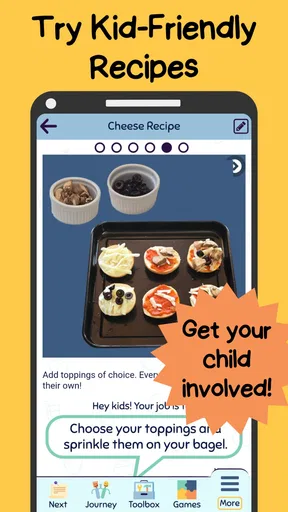
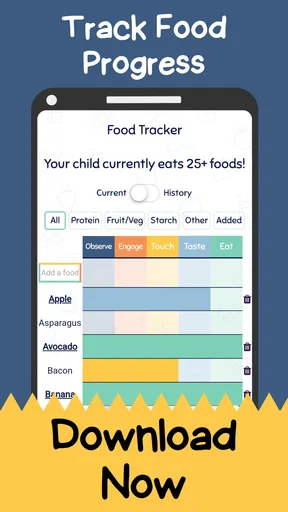
Our Review of Playful Eats: Fix Picky Eating
 Analysis by Appyee
Getting a child to try a new food is rarely solved by one clever sentence at the dinner table. In my experience, the bigger challenge is creating a calm routine around curiosity, repetition, and small wins. Playful Eats: Fix Picky Eating takes that everyday problem and turns it into a parenting app for children from birth through age eight. I found its central idea appealing: instead of treating mealtime as a battle, it encourages parents to introduce foods in a more playful, manageable way.
The app is free to download, with optional in-app purchases ranging from $11.99 to $59.99 per item. It is made by SpeakEasy Community and carries an Everyone age rating. Its current version is 1.0.6, and it runs on operating systems from version 9 onward. Those details make it accessible to many families, although the purchase structure is worth considering before handing the phone to a child.
How Playful Eats fits into real family routines
The most useful way to approach this app is not as a replacement for a parent, pediatrician, or family meal. I see it more as a prompt for changing how food is presented. A child who rejects vegetables, unfamiliar textures, or mixed dishes may respond better when the experience feels less like a test. The app’s playful framing can give parents a starting point when they have run out of ideas.
A realistic use case would be a busy weekday evening. You have prepared a familiar meal with one small addition, but your child immediately says no. Rather than insisting on a clean plate, you could use the app before or after dinner to make that new ingredient feel less intimidating. The important shift is not persuading the child instantly; it is making exposure feel ordinary enough to repeat another day.
That distinction matters. Parents looking for a guaranteed solution to severe food refusal will probably be disappointed. No app can identify every reason a child avoids food, and playful prompts cannot replace professional advice where eating difficulties involve health, development, allergies, or significant distress. For ordinary picky phases, though, the app can help turn a vague goal—“get my child to eat better”—into smaller actions.
I also like that the age range is broad. A baby beginning to explore food needs a different approach from a school-age child who has developed a fixed list of accepted meals. The app is therefore most useful when parents adapt its suggestions to the child’s stage rather than expecting one routine to work for everyone. The same playful idea may need to become a sensory exploration for a younger child and a simple food challenge for an older one.
Using the app without making the phone the main event
One trap with any parenting app is allowing the screen to become the reward. If a child only engages because the phone is in front of them, the activity may not transfer to the table. I would use Playful Eats as a short bridge: open it together, discuss the food or activity, then put the device aside while the child interacts with the real meal.
This approach also makes the app more practical for families with different screen rules. You do not need to turn dinner into a long digital session. A parent can consult it earlier in the day, choose one idea, and use that idea during shopping, preparation, or eating. That workflow is more sustainable than trying to keep a child occupied with the app while also managing plates, spills, and conversation.
For younger children, adult involvement is especially important. The Everyone rating describes the app’s general suitability, but it does not mean a toddler should navigate a device independently. I would keep the phone in the parent’s hands, explain what is happening in simple language, and treat the app as a shared activity. Older children can have more control, but I would still check that the experience supports curiosity rather than pressure.
Where an internet connection can shape the experience
Connectivity is easy to overlook when an app is used in the kitchen, but family routines often happen in imperfect network conditions. You might be preparing breakfast in a room with weak reception, using a tablet away from the home router, or trying to open the app during a trip. Any screen-based activity can feel less dependable when a connection is unstable, so I would avoid making a new food introduction depend entirely on opening the app at the exact right moment.
My practical advice is to explore the app before the meal, while the connection is reliable, and decide what you want to try. That removes pressure from the dinner table. If the app loads normally when you need it, it becomes a helpful companion. If connectivity interrupts access, you still have a plan rather than a disappointed child waiting for the screen.
This is also why I would not treat it as the only source of meal ideas. Keep a small offline list of foods your child has accepted, foods they have touched but not tasted, and foods that caused a strong reaction. That simple note can support the same gradual approach even when the app is unavailable. It also gives you a clearer picture of progress than relying on memory.
Parents should also think about when network access is appropriate for their household. A child may be more interested in tapping through an activity than noticing the smell, color, or texture of food. If the connection is working but the screen is distracting, the better choice may be to close the app after gathering the idea. In my view, connectivity should support the routine, not control it.
What to do when a session goes wrong
Mealtime tools are judged in messy situations, not ideal ones. A child may refuse to participate, become frustrated, or lose interest after a few seconds. The app cannot remove those reactions, and parents should not interpret them as failure. The useful question is whether the activity can be shortened, simplified, or moved to another moment.
If the app stops responding or does not load as expected, I would first leave the meal out of the troubleshooting process. Serve the food in the calmest way possible, then revisit the app later. Restarting the app or checking the connection may solve a technical interruption, but arguing with a hungry child while waiting for a screen is rarely worth it.
A second recovery strategy is to separate tasting from eating. A child may be willing to look at a new food, smell it, touch it, or place it on their plate without taking a bite. Those steps can still be meaningful. Playful Eats works best when parents use its spirit to recognize these smaller forms of engagement instead of turning every activity into a demand to swallow.
There is another kind of failure to watch for: repeating the same approach after a child has clearly had enough. A playful activity can become pressure if the adult keeps pushing. I would set a stopping point before beginning, especially with children who become anxious around unfamiliar foods. Ending on a neutral note makes it easier to return to the idea later.
In-app purchases are another point where recovery requires attention. Because the app is free but offers paid items, I would review the purchase flow before allowing unsupervised use. A child may tap through an appealing screen without understanding that a transaction is involved. Keeping purchases under adult control avoids an unpleasant surprise and keeps the app’s role clear.
Being thoughtful about data, screens, and family habits
Data-conscious use is not only about technical settings. It is also about deciding what information the app should influence in your household. Food preferences can be personal, and parents may want to avoid turning every meal into a recorded performance. I prefer using the app to prompt observation rather than creating pressure to document every bite.
A simple paper note or private family routine can work alongside the app. Write down the food offered, the child’s reaction, and what made the moment easier or harder. This gives you useful context: perhaps the child accepts a new food when it is separated from other foods, or perhaps they are more open to trying something after helping prepare it. Those insights are often more valuable than a single successful tasting.
Screen time also deserves a deliberate boundary. The app belongs in the Parenting category, but that does not make it a substitute for conversation, cooking, or sensory play. I would use it in short bursts and then move the lesson into the physical world. For example, a child could choose between two ingredients, wash a fruit, arrange safe pieces on a plate, or describe a smell. The device starts the interaction; the family should finish it.
Families with multiple children may need different rules. An older child might enjoy taking part in choosing a challenge, while a younger sibling may simply watch. Avoid presenting one child’s progress as a competition for another. The app is more helpful when it supports individual comfort levels, especially because food acceptance can vary dramatically between siblings.
The developer, SpeakEasy Community, has positioned the app around making food introduction easier and more playful. In everyday use, the value depends heavily on the parent’s judgment. If you use it as a source of gentle prompts, it can reduce the mental effort of planning. If you expect it to manage the entire feeding process, its limitations become much more noticeable.
How it compares with familiar alternatives
The usual alternative is free: parents rely on advice from family, pediatric resources, recipes, or their own experience. Those sources can offer more context than an app, especially when a child’s eating pattern is complex. They may also be easier to consult when the phone is unavailable. Playful Eats has an advantage in immediacy, because it is designed around turning a difficult food moment into an activity rather than asking a parent to read a long article.
Recipe apps are another comparison point. They are useful when the problem is what to cook, but picky eating is not always solved by disguising ingredients or finding a more attractive recipe. Playful Eats is better suited to the behavior around food: introducing, exploring, and reducing tension. A recipe collection may be the stronger choice for meal planning, while this app is more relevant when the meal is already prepared and the child is hesitant.
General child-development apps can provide broader games and learning activities, but they may not focus as directly on eating routines. That narrow focus is a strength for parents who want a specific tool. It is also a limitation for anyone seeking a complete family organizer, nutrition tracker, or developmental program. I would not download it expecting those wider functions.
The rating of 4.4 from around fifty ratings suggests that early users have generally responded well, while the total of over ten thousand installs shows that it has reached a modest but meaningful audience. I would treat those figures as signs of interest rather than proof that it will suit every child. Picky eating is highly individual, and a positive experience for one family may not translate directly to another.
Who will benefit most, and who should look elsewhere
I think the app is a good fit for parents of young children who want fresh ways to introduce foods without turning each meal into a negotiation. It is especially suitable for someone who already believes in gradual exposure but needs help creating playful prompts. It can also help a parent who notices that their child is curious away from the table but resistant once food is served.
It is less suitable for families wanting detailed nutrition analysis, medical guidance, or a strict progress system. Parents who dislike using screens around food may prefer books, printed activity cards, or direct advice from a qualified professional. The optional purchases may also make the app less appealing if you are looking for a completely free experience rather than a free starting point.
I would be cautious if the child has a history of serious reactions, swallowing concerns, or intense distress connected with eating. In those situations, playful encouragement should not be treated as a treatment plan. A healthcare professional can help determine what is safe and appropriate, while the app can remain an optional source of low-pressure ideas only if it fits that guidance.
For a family deciding whether to try it, the best test is simple: use one activity with one familiar food and one small unfamiliar element, then observe the child’s response without demanding a bite. If the app helps you stay patient and consistent, it is doing something valuable. If it creates more screen negotiation or makes the child feel watched, stop using it during meals and reconsider whether it belongs in your routine.
My connectivity verdict and overall recommendation
Playful Eats: Fix Picky Eating is a focused parenting app rather than a complete answer to feeding challenges. I appreciate its attempt to make food exploration feel lighter, and I found its strongest value in helping parents choose a small, repeatable action instead of improvising under dinner-time pressure. The free entry point makes it easy to test, while the paid items mean adults should pay attention to the purchase experience.
Its connection-dependent moments should be handled with a little planning. Open it before a busy meal, take the useful idea with you, and do not let a weak signal or a loading problem become part of the child’s food experience. Keep a non-digital backup, and remember that the most important part of the process happens away from the screen.
With an average rating of 4.4 and an Everyone rating, it is a reasonable option for families seeking gentle, playful support. I would recommend it to parents who want practical inspiration for children from birth through age eight and are comfortable staying actively involved. The best results come when the app opens the door to exploration, while the parent controls the pace, the boundaries, and the final decision to stop.
Verdict
Strengths of Playful Eats: Fix Picky Eating
- Fun games make trying unfamiliar foods feel less intimidating.
- Simple activities are suitable for young children to use independently.
- Progress tracking helps parents notice changing food preferences.
- Short sessions fit easily into busy family routines.
- Encourages positive mealtime conversations without focusing on rewards.
Limitations of Playful Eats: Fix Picky Eating
- Some features may require a subscription or in-app purchases.
- The activities may feel repetitive after extended use.
- Results depend heavily on consistent support from parents or caregivers.
- Food suggestions may not suit every child’s allergies or dietary needs.
- Younger children may need help understanding and completing some tasks.
Other Releases by SpeakEasy Community
View All
SpeakEasy: Home Speech Therapy
Parenting3.6

Autism Speech and Language
Parenting3.8
Similar Picks in This Category
View All
Family Space
Motorola Mobility LLC.3.9

شرطة الأطفال - مكالمة وهمية
Oub Apps4.1

Findmykids: Parental Control
LETEM LTD4.6

Pregnancy + | Tracker App
Philips Electronics UK Limited4.8

Policía de niños - para padres
Kids police4.7

Pregnancy App
Amila4.9
Frequently Asked Questions
What is Playful Eats: Fix Picky Eating?
Playful Eats: Fix Picky Eating is a family-focused app designed to make mealtimes more positive for children who are selective or hesitant eaters. It uses playful activities, guidance, and practical ideas to help parents introduce foods without turning meals into a battle. The app is intended to support gradual progress and healthier eating habits rather than promise an instant solution.
How can Playful Eats help a picky eater?
The app encourages parents to approach food with patience, repetition, and less pressure. Its activities and suggestions can help children become more comfortable seeing, touching, smelling, and eventually tasting unfamiliar foods. In my experience, the most useful aspect is its focus on making food exploration feel enjoyable. Results will vary, and consistent support at home is still essential.
Is Playful Eats: Fix Picky Eating suitable for every child?
Playful Eats may be useful for many young children with ordinary food preferences or mild selective eating, but it is not a replacement for professional medical or nutritional care. Children with allergies, swallowing difficulties, developmental conditions, poor growth, severe food restriction, or strong distress around eating may need an assessment from a pediatrician or feeding specialist before relying on app-based guidance.
Does the app provide meal plans or personalized advice?
The exact features can depend on the current version, subscription level, and the child’s profile. Playful Eats generally focuses on educational guidance, playful food activities, and strategies parents can use during everyday meals rather than functioning as a complete medical meal-planning service. Parents should review the available tools carefully and adapt any suggestions to their child’s age, allergies, culture, and dietary needs.
Is Playful Eats: Fix Picky Eating free to download?
The app’s download availability, free features, subscriptions, and in-app purchases may differ between Android and iOS and can change over time. Before installing, check the official store listing for the current pricing, trial terms, renewal conditions, and cancellation instructions. If a free trial is offered, remember to cancel it through your store account before renewal if you decide not to continue.
